Reviews | Software Reviews – Office Software Alternatives 2026
In 2026, office software is essential for students, professionals, freelancers, and businesses to create documents, spreadsheets, presentations, and collaborate online. Microsoft Office is widely used but many office software alternatives provide similar features at lower costs. Modern office software alternatives are cloud-based, compatible with multiple devices, and include AI-powered tools to increase productivity. Choosing the right office software ensures efficiency, professional results, and smooth collaboration.
What Are Office Software Alternatives
Office software alternatives are programs that provide tools similar to Microsoft Word, Excel, PowerPoint, and OneNote. They allow users to create text documents, analyze data in spreadsheets, design presentations, and collaborate online. Many alternatives are free or offer subscriptions at lower costs compared to Microsoft Office. Some include cloud storage, AI-powered suggestions, real-time collaboration, templates, and mobile access. These alternatives are ideal for students working on assignments, professionals managing projects, and small businesses improving productivity.
Why Use Office Software Alternatives
Office software alternatives are cost-effective and versatile. They allow users to open and edit Microsoft Office files without losing formatting. Cloud-based alternatives help teams work remotely and collaborate in real time. Many alternatives are lightweight and run efficiently on older computers and mobile devices. AI features such as grammar checks, formatting suggestions, and smart templates simplify work and save time. Using these tools ensures productivity, creativity, and compatibility across platforms.
Key Features to Look for in Office Software Alternatives
When choosing office software alternatives, consider document editing options to create, format, and save text documents. Spreadsheets should support formulas, charts, and data analysis. Presentation tools should allow adding images, videos, animations, and templates. Cloud storage and cross-platform support are essential to access files from multiple devices. Collaboration tools let multiple users edit documents simultaneously. AI assistance helps with grammar, spelling, and smart formatting. Compatibility with Microsoft Office formats like .docx, .xlsx, and .pptx ensures smooth workflow.
Top 10 Office Software Alternatives 2026
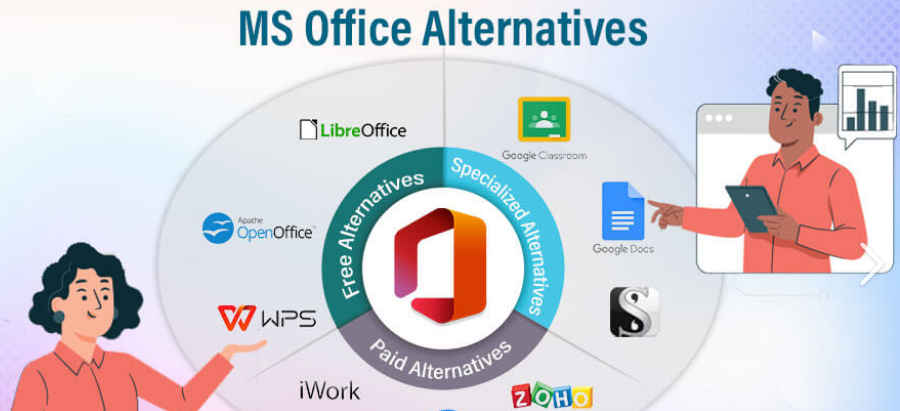
Google Workspace Docs, Sheets, and Slides offer cloud-based office tools with real-time collaboration, AI-powered suggestions, templates, and free access with a Google account. LibreOffice is free and open-source with Writer, Calc, Impress, and Draw offering full compatibility with Microsoft Office files. OnlyOffice provides desktop and web-based tools for documents, spreadsheets, and presentations with team collaboration features. Zoho Office Suite is an online suite with AI-powered tools, templates, and seamless integration with other Zoho apps. WPS Office is lightweight and free with Writer, Spreadsheets, and Presentation, compatible with MS Office formats. Apple iWork includes Pages, Numbers, and Keynote for Mac and iOS users with cloud integration via iCloud. SoftMaker FreeOffice is a free alternative with essential tools, lightweight design, and strong compatibility. Calligra Suite is open-source for Linux and Windows with documents, spreadsheets, and presentation tools. Polaris Office is cloud-based with cross-platform support, AI suggestions, and mobile editing. Etherpad is a web-based real-time collaborative editor ideal for group projects and team documentation.
Comparison of Office Software Alternatives
Google Workspace supports Windows, Mac, Android, and iOS, includes AI suggestions, real-time collaboration, templates, free and paid plans, and is ideal for students and professionals. LibreOffice works on Windows, Mac, and Linux, offers offline editing, open-source, free, suitable for budget users. OnlyOffice is compatible with Windows, Mac, Linux, web, offers collaboration features, free and paid plans, best for teams. Zoho Office Suite is web-based, AI-powered, subscription-based, great for businesses. WPS Office works on Windows, Mac, Android, iOS, offers lightweight tools, free and paid plans, ideal for students and casual users. Apple iWork is free for Mac and iOS, cloud-integrated, user-friendly, best for Apple users. SoftMaker FreeOffice is lightweight, Windows and Mac compatible, free, suitable for offline use. Calligra Suite works on Linux and Windows, open-source, free, for Linux users. Polaris Office is cloud-based, cross-platform, mobile-friendly, offers AI suggestions, free and subscription plans, great for mobile users. Etherpad is web-based, free, real-time collaboration, ideal for group projects and classroom use.
Pricing and Plans
Google Workspace offers a free basic plan and paid plans for advanced features. LibreOffice, Calligra Suite, SoftMaker FreeOffice, and Etherpad are completely free. OnlyOffice, Zoho Office Suite, WPS Office, Polaris Office, and Apple iWork offer freemium or subscription-based models. Subscription plans provide cloud storage, premium templates, AI features, and advanced collaboration tools. Choosing the right plan depends on user needs, device compatibility, and level of features required.
Pros and Cons of Office Software Alternatives
Google Workspace provides excellent collaboration, cloud storage, and AI features but requires internet access for full functionality. LibreOffice is free, fully offline, and open-source but lacks advanced cloud features. OnlyOffice is ideal for teams and cross-platform use but may have a learning curve. Zoho Office Suite offers AI tools and integration but requires subscriptions. WPS Office is lightweight, free, and easy to use but has limited cloud features in free version. Apple iWork is user-friendly and free for Apple devices but not available on Windows. SoftMaker FreeOffice is lightweight and free but lacks cloud collaboration. Calligra Suite is open-source and free but mostly for Linux users. Polaris Office is cloud-based and mobile-friendly but premium features require subscription. Etherpad is free and perfect for collaboration but lacks advanced formatting and AI features.
Tips for Using Office Software Alternatives
Start with a tool that matches your skill level and workflow requirements. Use cloud-based tools for real-time collaboration with classmates or colleagues. Explore AI features to save time on grammar checks and formatting. Organize your files and back them up regularly. Test free versions before committing to subscriptions. Ensure compatibility with Microsoft Office files for smooth sharing. Combine multiple tools if needed to maximize productivity and creativity.
Frequently Asked Questions
Are office software alternatives free Many alternatives like LibreOffice, Etherpad, SoftMaker FreeOffice, and Google Workspace basic plan are free Can I open Microsoft Office files with alternatives Most alternatives support docx, xlsx, pptx Are these tools good for students Yes, they are perfect for homework, projects, and group assignments Can businesses use office software alternatives Yes, cloud-based tools like Google Workspace and Zoho Office Suite are suitable for professional use Do these alternatives offer AI tools Some alternatives include AI-powered grammar checks, formatting suggestions, and smart templates Can I collaborate with multiple people Cloud-based alternatives allow real-time editing and teamwork
Conclusion
The best office software alternatives in 2026 provide affordability, productivity, cloud integration, cross-platform support, and AI-powered features Tools like Google Workspace, LibreOffice, OnlyOffice, Zoho Office Suite, and WPS Office allow students, professionals, and businesses to create documents, spreadsheets, and presentations efficiently Cloud-based alternatives improve collaboration, AI assistance saves time, and compatibility ensures smooth workflow Choosing the right office software alternative ensures professional-quality results, efficient collaboration, and accessible productivity making these tools essential for work, school, and personal projects in 2026