Best PC gaming setup tips
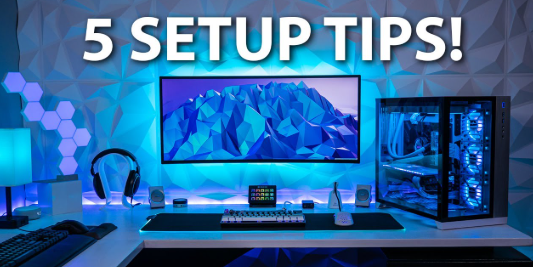
PC gaming in 2026 is more exciting than ever, with high-performance games, realistic graphics, and online multiplayer experiences. To enjoy smooth gameplay and prevent lag or hardware issues, having the right PC gaming setup is essential. A proper setup includes the right PC, peripherals, desk, monitor, and accessories. Here’s a complete guide to PC gaming setup tips for beginners and advanced players.
Why a Good PC Gaming Setup Matters
A well-planned setup improves gameplay performance, reduces strain, and enhances comfort. Benefits include:
- Better Performance – Fast loading times and high frame rates.
- Comfortable Gaming – Proper desk, chair, and monitor height prevent strain.
- Immersive Experience – Good monitors, sound systems, and peripherals make gaming more fun.
- Organized Space – Keeps cables, accessories, and devices neat and accessible.
Essential PC Gaming Setup Components
- Gaming PC or Laptop – Choose a PC with a fast processor (Intel i5/i7 or AMD Ryzen 5/7), enough RAM (16GB or more), and a good graphics card (NVIDIA RTX or AMD Radeon).
- Monitor – A high-refresh-rate monitor (120Hz or 144Hz) ensures smooth visuals. Consider resolution: Full HD (1080p) for budget or 4K for high-end setups.
- Keyboard and Mouse – Mechanical keyboards and responsive gaming mice improve accuracy and reaction time.
- Headset – High-quality headphones with a microphone help in multiplayer games and make sound effects more immersive.
- Desk and Chair – A sturdy desk and ergonomic chair support long gaming sessions and prevent back strain.
- Mousepad – Large mousepads improve smooth mouse movement for accuracy.
- Cooling System – Proper PC cooling prevents overheating during long sessions. Include fans or liquid cooling if needed.
- Lighting and Ambiance – LED lights or smart lighting can improve focus and make gaming visually appealing.
- Speakers – Optional for immersive sound when not using headphones.
- Cable Management – Use cable organizers or clips to keep wires tidy and prevent clutter.
Tips to Optimize Your PC Gaming Setup
- Place the monitor at eye level to avoid neck strain.
- Keep the desk organized with cable clips, trays, or racks.
- Maintain a comfortable chair height to keep arms and wrists in the correct position.
- Use a good internet connection for online multiplayer games.
- Keep your PC updated with the latest drivers and software.
- Adjust monitor settings like brightness, refresh rate, and resolution for the best display.
- Add decorative elements like posters or RGB lighting for a personalized touch.
- Ensure enough ventilation around your PC to prevent overheating.
Benefits of a Good PC Gaming Setup
- Improved Performance – Faster gameplay, smoother graphics, and fewer crashes.
- Comfort and Safety – Reduces strain on eyes, neck, and wrists.
- Better Focus – Organized space helps concentrate on games or streaming.
- Enhanced Experience – Sound, visuals, and responsiveness make games more enjoyable.
- Long-Term Savings – Proper setup prevents damage to hardware, saving money on repairs.
Frequently Asked Questions (FAQ)
Do I need an expensive PC to start gaming?
No, a mid-range PC or laptop can handle most games if you adjust graphics settings.
Is a gaming chair necessary?
While optional, an ergonomic chair prevents strain during long gaming sessions.
What monitor size is best for gaming?
24–27 inches with 120–144Hz refresh rate is ideal for most players.
Do I need a wired or wireless mouse?
Both work, but wired mice often have slightly faster response times.
How important is cable management?
Very important for safety, organization, and aesthetics.
Conclusion
A proper PC gaming setup in 2026 ensures smooth gameplay, comfort, and an immersive experience. By choosing the right PC, monitor, keyboard, mouse, headset, and maintaining an organized space, you can enjoy gaming to the fullest. Following these tips helps prevent hardware issues, reduce strain, and make your gaming area fun and efficient. Whether you are a beginner or a competitive gamer, a good PC gaming setup is essential for long-term enjoyment and performance.