Save Battery with Smart Tricks in Android 14
Battery life remains one of the biggest concerns for smartphone users in 2026. Whether you use your phone for gaming, streaming, social media, video calls, or office work, running out of battery at the wrong time can be frustrating. The good news is that Android 14 introduces smarter power management features designed to extend battery life without slowing down your device. With the right settings and habits, you can easily gain several extra hours of usage each day.
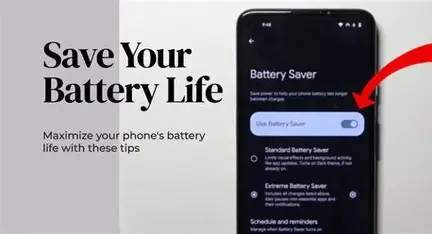
One of the most effective tools is Battery Saver Mode. This feature reduces background activity, limits animations, and prevents unnecessary syncing. You can activate it manually by going to Settings > Battery > Battery Saver, or set it to turn on automatically when your battery drops to a specific percentage such as 20 percent. This ensures your phone conserves power when you need it most.
Another powerful feature is Adaptive Battery. Android 14 uses AI-based learning to understand how you use your apps. It automatically limits battery usage for apps you rarely open while keeping your frequently used apps running smoothly. You can enable it in Settings > Battery > Adaptive Battery. Over time, this feature becomes more accurate and efficient.
Many apps continue running in the background even when you are not using them. This silent activity drains battery slowly. To control this, go to Settings > Apps > Select the app > Battery and choose “Restricted” for apps that do not require constant updates. This small adjustment can noticeably improve battery performance.
The display is usually the biggest battery consumer. Lowering screen brightness and turning on Adaptive Brightness allows your phone to automatically adjust brightness based on your environment. This prevents unnecessary power usage in darker settings. Additionally, switching to Dark Mode can significantly save battery on phones with OLED displays because dark pixels consume less energy.
You should also reduce screen timeout duration. Setting it to 30 seconds or one minute ensures your display turns off quickly when not in use. If your phone supports Always-On Display, consider disabling it, especially overnight, as it constantly uses power to show time and notifications.
Connectivity features can also impact battery life. Turn off Bluetooth, NFC, GPS, or Wi-Fi scanning when not needed. If you are in an area with weak 5G signal, switching to LTE can improve battery efficiency because unstable 5G connections force the phone to work harder.
For emergencies or long travel days, Extreme Battery Saver Mode is extremely helpful. This feature limits your phone to essential apps only, extending battery life dramatically.
Keeping apps updated is another simple but effective step. Developers regularly release updates that improve performance and reduce unnecessary power consumption. Finally, regularly check battery usage statistics in Settings > Battery > Battery Usage to identify power-hungry apps and manage them accordingly.
By combining these settings with smart daily habits, Android 14 users can significantly extend battery life without compromising performance.
FAQ: Saving Battery on Android 14
Q1: Does Android 14 improve battery life compared to older versions?
Yes. Android 14 includes enhanced background app control and improved adaptive battery optimization.
Q2: Is it safe to restrict background apps?
Yes, but avoid restricting important communication apps if you rely on real-time notifications.
Q3: Does Dark Mode really save battery?
On OLED screens, yes. Dark pixels use less power than bright ones.
Q4: Should I keep Battery Saver on all the time?
It is safe to use regularly, but some background functions may be limited. It’s most useful when battery is low.
Q5: Why does 5G drain battery faster sometimes?
In weak signal areas, your phone uses more power to maintain connection. Switching to 4G can improve battery performance.
With these Android 14 battery-saving strategies, you can enjoy longer usage time and better efficiency throughout your day.