MacBook vs Windows Laptop Comparison For Students ?
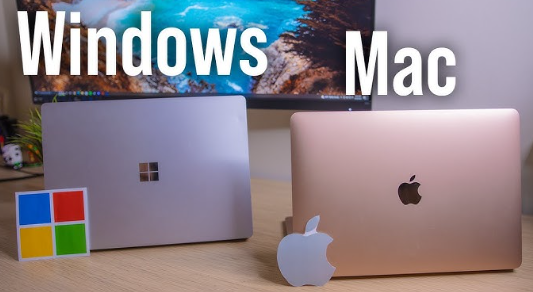
Choosing between a MacBook and a Windows laptop is one of the most common dilemmas for students, professionals, and casual users in 2026. Both platforms offer powerful hardware, modern designs, and a range of features, but they differ in performance, software ecosystem, portability, customization, and price. Understanding the differences helps you select the right laptop for your needs.
MacBook vs Windows Laptop Comparison Table 2026
| Feature | MacBook (Air M3 / Pro M3) | Windows Laptop (Dell, HP, ASUS, Lenovo) | Notes / Best Use |
|---|---|---|---|
| Processor (CPU) | Apple M3 / M3 Pro / M3 Max | Intel 14th/15th Gen i5/i7/i9, AMD Ryzen 7000/8000 series | MacBook CPU optimized for macOS, Windows laptops vary by model |
| RAM | 8GB – 32GB | 8GB – 64GB | Windows laptops often allow RAM upgrades |
| Storage | 256GB – 2TB SSD | 256GB – 2TB SSD / HDD options | Both support fast SSD, Windows may offer extra drives |
| Display | Retina / Liquid Retina XDR | Full HD, 2K, 4K OLED, high refresh rate (120–240Hz) | MacBook best for color accuracy, Windows better for gaming refresh rates |
| Graphics (GPU) | Integrated Apple GPU (M3) | Nvidia RTX series / AMD Radeon / Integrated | Windows laptops offer stronger gaming GPU options |
| Battery Life | 18–22 hours | 5–15 hours depending on model | MacBooks lead in battery efficiency |
| Build & Design | Premium aluminum, ultra-light | Aluminum / plastic, varies by brand | MacBooks are more portable and durable |
| Ports & Connectivity | Limited (USB-C, Thunderbolt) | USB-A, USB-C, HDMI, SD, Thunderbolt, more | Windows laptops usually offer more ports |
| Operating System | macOS 14 | Windows 12 | Choice depends on software preference |
| Software Ecosystem | Final Cut Pro, Logic Pro, Xcode, iWork | Microsoft Office, AutoCAD, Adobe Suite, Games | MacBooks strong for creative apps, Windows better for gaming/enterprise |
| Upgradeability | Limited | RAM and storage often upgradable | Windows laptops provide more flexibility |
| Price Range | $999 – $2,499+ | $400 – $2,500+ | Windows laptops cover all budgets |
| Best For | Students, coders, content creators, professionals | Gamers, general users, students, budget-conscious, multitaskers | MacBooks excel in productivity and longevity; Windows offers versatility |
MacBook Overview
MacBooks are laptops designed by Apple running macOS. They are known for premium build quality, long battery life, optimized software, and seamless integration with other Apple devices. In 2026, MacBook models include the MacBook Air M3, MacBook Pro M3, and MacBook Pro M3 Pro/Max. These laptops use Apple’s own M-series chips, offering excellent performance, energy efficiency, and quiet operation.
Key Features of MacBooks
- M3 or M3 Pro/Max processors for high efficiency and multitasking
- Retina or Liquid Retina XDR displays with accurate colors
- Long battery life (up to 18–22 hours on Air or Pro models)
- Lightweight, premium build quality
- macOS ecosystem with optimized software for productivity, content creation, and coding
- Seamless integration with iPhone, iPad, Apple Watch, and AirPods
Windows Laptop Overview
Windows laptops are made by multiple brands such as Dell, HP, Lenovo, ASUS, and Microsoft. They run Windows 12 (or compatible versions) and offer a wide range of hardware options from budget to high-end gaming or professional laptops. Windows laptops are versatile, customizable, and compatible with almost all software.
Key Features of Windows Laptops
- Intel 14th/15th Gen or AMD Ryzen 7000/8000 series processors
- Wide range of display options including OLED, high refresh rate, and 4K
- Variety of form factors: ultrabooks, 2-in-1 convertibles, gaming laptops
- Longer range of hardware configurations for RAM, storage, and GPU
- Windows 12 OS compatible with almost all software including enterprise and gaming applications
- More price options from budget-friendly to premium
Performance Comparison
MacBook – Apple M-series chips offer excellent multitasking, fast boot times, optimized performance for creative software, coding, and media editing. They are highly energy-efficient, keeping the laptop cool and quiet.
Windows Laptop – Performance depends on configuration. High-end Windows laptops with Intel i9 or AMD Ryzen 9 and Nvidia RTX GPUs can outperform MacBooks in gaming and 3D rendering. Budget Windows laptops offer reliable performance for general tasks but may have shorter battery life.
Display and Design
MacBook – Sleek aluminum design, minimalistic look, thin bezels, accurate colors, and excellent brightness. Retina and Liquid Retina XDR displays are ideal for photo/video editing.
Windows Laptop – More variety in design and displays. High refresh rates and OLED panels are available, but build quality varies by brand and price. Some Windows laptops are heavier than MacBooks but offer more ports and features.
Software Ecosystem
MacBook – macOS offers smooth performance, less vulnerability to malware, and exclusive apps like Final Cut Pro, Logic Pro, and Xcode. Great for creators and developers in the Apple ecosystem.
Windows Laptop – Windows 12 supports nearly all apps, games, and enterprise software. Better for gamers, business software, and users who need customization. Frequent updates and compatibility with peripherals make Windows versatile.
Battery Life
MacBook – Long battery life up to 22 hours on MacBook Air M3, optimized for efficiency with M-series chips.
Windows Laptop – Battery varies by model. Ultrabooks can reach 10–15 hours, while gaming laptops last 3–6 hours under heavy use.
Price Comparison
MacBook – Premium pricing starting around $999 for MacBook Air and $1,299+ for MacBook Pro. More expensive but offers long-term value, durability, and software optimization.
Windows Laptop – Wide range of prices. Budget laptops start around $400–500, mid-range around $700–1,000, and high-end laptops $1,500+. More flexible for different budgets.
Pros and Cons
MacBook Pros
- Long battery life and energy-efficient
- Premium build and lightweight design
- Smooth macOS ecosystem
- Optimized for creative tasks and coding
MacBook Cons
- Expensive
- Limited hardware upgrade options
- Fewer ports without adapters
Windows Laptop Pros
- Wide hardware variety and customizable
- Compatible with most software and games
- Affordable options for all budgets
- Multiple ports and upgrade possibilities
Windows Laptop Cons
- Battery life shorter on some models
- Build quality varies by brand
- Some models run hotter and noisier
Frequently Asked Questions (FAQ)
Which is better for students?
MacBooks are ideal for coding, design, and long battery life. Windows laptops are better for general use, gaming, and budget options.
Can I play games on MacBook?
MacBooks can run some games, but Windows laptops support more titles and higher graphics performance.
Which laptop lasts longer?
MacBooks usually last 5–7 years with software updates. Windows laptops vary by brand and hardware but can last 3–5 years.
Are MacBooks worth the price?
Yes, for users who value performance, battery life, durability, and creative tools.
Can I upgrade a MacBook?
Most MacBooks have limited upgrade options, usually RAM and storage are fixed.
Which is better for software compatibility?
Windows laptops support the widest range of software, including enterprise, gaming, and specialized apps.
Which laptop is more portable?
MacBooks are lighter and thinner than most Windows laptops, making them highly portable.
Conclusion
Choosing between a MacBook and a Windows laptop in 2026 depends on your priorities. MacBooks are excellent for long battery life, creative work, coding, and seamless integration in the Apple ecosystem. Windows laptops offer versatility, a wide price range, upgrade options, and better gaming compatibility. Students, professionals, and casual users should evaluate their needs, budget, and preferred software to make the best choice.